Insights, Web Development
How AI Development Is Changing Front-End Workflows
-
- August 11th, 2026

See how AI development changes coding, design, testing, and debugging while keeping human judgment at the centre of front-end work.
AI development is changing how you build interfaces, fix bugs, test components, and move designs into production. The biggest change is not that an AI tool can complete a line of JavaScript. It is that the tool can now inspect a repository, edit several files, run commands, check its work, and prepare a pull request.
Design-to-code tools are changing as well. Instead of working from a screenshot alone, newer systems can access components, variables, layouts, and design-system rules. This gives you a better starting point, but it does not remove the need for technical judgment.
The result is a different front-end workflow. You can spend less time producing predictable code and more time defining requirements, reviewing decisions, testing edge cases, and protecting the quality of the final experience.
What does AI development mean for front-end work?
AI development covers several types of code automation.
For example, AI code assistants can help you write, explain, refactor, and debug code inside your editor. Coding agents can take a larger task, work across multiple files, run tests, and suggest a completed change. And design-to-code tools can turn prompts or design files into components and pages.
These categories are also beginning to overlap. A single AI developer tool may generate a component, connect it to an existing design system, launch the application, inspect the browser, and fix an error it finds.
Code assistants are becoming coding agents
Earlier AI assistants mainly suggested short code completions. In 2026, many tools are designed to complete broader tasks.
GitHub Copilot’s coding agent can review its own changes, run security checks, use custom agents, and hand work between GitHub and the command line. OpenAI’s Codex app supports multiple agents working on separate tasks, while developers can oversee their progress from one workspace. delegate a contained issue such as creating a component, updating a dependency, adding tests, or fixing a documented bug. The agent can explore the relevant files and prepare a proposed solution.
You still need to define the task clearly. A vague request often produces a vague implementation.
Design-to-code tools have better context
Design-to-code tools used to produce generic HTML and CSS that looked similar to a screenshot. The current workflow is becoming more connected to the actual product.
Figma’s MCP server can give an AI coding tool access to selected frames, components, variables, and layout data. You can send structured design context into your development environment instead of manually explaining every spacing value or component relationship. s workflows that move production code back onto the design canvas. This creates a closer loop between what designers explore and what developers can ship. still needs adjustment. A design file rarely explains every loading state, validation rule, API dependency, keyboard interaction, or responsive exception.
Prototyping takes less time
Tools such as v0 can turn a description or product requirement into a working interface. You can explore layouts, generate components, add interactions, and preview the result before committing to a full implementation.
Vercel describes the current version of v0 as a coding environment that can take prototypes toward production code and existing Git workflows. Designers can also work against functional code rather than creating static mockups for every change. useful when you need to test an idea quickly. You can compare several approaches without manually building each version from the beginning.
Fast generation does not guarantee a strong product decision. You still need to decide which version fits the user, the brand, the content, and the technical limits of the project.
Debugging is becoming conversational
AI in frontend development is moving into the browser.
Chrome DevTools AI assistance can investigate styling problems, network requests, source files, and performance issues. Its 2026 updates added access to Lighthouse data and broader page context, allowing it to help diagnose questions such as why a request fails or what is affecting a page’s Largest Contentful Paint score. r agents can also let coding agents inspect network activity, record performance traces, test responsive layouts, and simulate slower devices or connections. ask an agent to implement a change and then examine how that change behaves in the browser. This is a stronger workflow than generating code without seeing the result.
Testing moves closer to code generation
AI developer tools are also gaining access to component and testing environments.
Storybook 10.3 introduced MCP support that lets AI agents find existing React components, read their documentation, create stories, and run focused component and accessibility tests. The agent can use real components instead of inventing replacements that do not match the project. create initial test coverage, check component states, and catch straightforward issues earlier.
You should still decide what the tests need to prove. An automatically generated test can pass while checking the wrong behavior.
Where does code automation help most?
Creating a first draft
AI works well when you need an initial component structure, CSS layout, test file, type definition, or utility function.
The output gives you something concrete to inspect. You can then correct the structure and adapt it to your project instead of starting with a blank file.
Handling repetitive changes
Code automation can update imports, rename properties, convert similar components, write routine documentation, and apply a known pattern across several files.
These tasks are usually easier to verify because you already know what the finished result should look like.
Exploring an unfamiliar codebase
An AI assistant can explain how components connect, locate relevant files, trace a data flow, or summarize an existing implementation.
This can reduce the time you spend manually searching through a large repository. The explanation should still be checked against the actual code, particularly when the project uses unusual conventions.
Producing basic tests
AI can suggest unit, component, and end-to-end tests based on existing behavior. It can also identify obvious states that have no coverage.
You gain the most value when you provide acceptance criteria first. Without them, the tool tends to test the implementation it sees rather than the behavior the product requires.
AI output still needs developer review
Generated code can look convincing even when it contains an incorrect assumption.
OpenAI’s 2026 account of building with Codex found that agents struggled when the engineering environment was underspecified. Developers had to create clearer tools, abstractions, documentation, and project structures before the agents could complete higher-level work reliably. Directly to front-end development. An agent performs better when it can see your component library, coding standards, design tokens, tests, browser output, and definition of done.
Better prompts help, but project context matters more than clever wording.
Generated code can introduce security problems
AI-generated code should go through the same security checks as code written manually.
A 2026 comparative study tested code generated by seven language models and found vulnerabilities in the output from every model evaluated. Many of the detected issues were rated as high or critical severity. It means you should never treat generated code as trusted code.
Review authentication logic, data handling, dependencies, input validation, API requests, and exposed environment values carefully. Run your normal static analysis, dependency scanning, tests, and pull request reviews.
A working interface is not always a good interface
AI tools can create a page that renders correctly but still feels wrong to use.
The navigation may be unclear. The responsive layout may technically fit the screen while placing important content in the wrong order. A form may work with a mouse but fail with a keyboard. Generated copy may not explain an error or tell the user what to do next.
These problems require an understanding of the full user journey. The AI sees the information you provide. You see how the interface fits into the product.
Where do humans win?
Product judgment
You decide which problem deserves to be solved.
An AI tool can produce five versions of a dashboard, but it cannot reliably determine which information your users need first. You connect user research, product goals, content, and technical constraints.
System thinking
You understand how one change affects the rest of the application.
You can spot when a quick component creates duplicated logic, weakens the design system, increases bundle size, or makes a future feature harder to build. AI often focuses on completing the immediate task unless you explicitly provide the wider context.
Accountability
You are responsible for what reaches the user.
You decide whether the code is secure, accessible, maintainable, and ready for production. AI can support the review, but it cannot own the consequences of a poor implementation.
How to build a reliable AI-assisted workflow?
Start with a bounded task
Give the tool a task that has a clear result.
“Create the empty, loading, error, and success states for this component” gives the agent a useful target. “Improve this page” leaves too many decisions undefined.
Include acceptance criteria, relevant files, supported browsers, framework versions, and restrictions that the agent must respect.
Give the tool real project context
Connect the AI to your repository, design system, documentation, browser tools, and component library where possible.
Storybook MCP, Figma MCP, repository instruction files, and Chrome DevTools for agents all follow the same principle. AI produces better front-end code when it can inspect the systems that already exist. mall Enough to Review
A large generated feature may hide unnecessary dependencies, repeated logic, and incorrect assumptions.
Break the work into component structure, data integration, interactions, responsive behavior, accessibility, and tests. Review each stage before moving to the next one.
This also makes it easier to identify which instruction caused a problem.
Test behaviour instead of appearance alone
A screenshot can confirm that the page looks close to the design. It cannot confirm that the interface works.
Test keyboard navigation, focus order, validation, error states, loading states, slow networks, smaller screens, empty data, long content, and failed requests.
AI agents can help run these checks, but you need to define the important scenarios.
Review the final diff yourself
Read the code before merging it.
Check whether the agent reused existing components, followed the project architecture, introduced new dependencies, changed unrelated files, and handled error cases. Ask the tool to explain unusual decisions, but confirm the explanation in the implementation.
Treat AI code review as an additional review layer rather than your final approval. GitHub’s current review tools can identify potential bugs and readability issues inside the pull request workflow, but the product decision remains yours. lore
GitHub copilot
GitHub Copilot combines editor assistance, code review, command-line tools, and coding agents. It is useful when your work already runs through GitHub issues and pull requests.
You can use it for contained feature work, bug fixes, repository questions, test generation, and initial reviews.
Some developers have recently become less enthusiastic about Copilot’s pricing model. Agent tasks can consume a large share of the monthly credit allowance, especially when you use more capable models or higher reasoning settings.

The development experience remains strong, but frequent agent use may become expensive or difficult to sustain throughout the month.
OpenAI codex
Codex is designed for agent-based software work across repositories. Its app lets you delegate several tasks and inspect the resulting changes from one place.
It is worth exploring when you want to run separate investigations, fixes, or implementation tasks in parallel. laude Code works inside development environments and supports longer coding tasks, large codebase context, agent planning, and tool use.

Claude Design can also build a reusable understanding of your components, colors, typography, codebase, and design files. This can help connect design exploration with the implementation you already maintain. ma MCP connects structured design information to compatible coding tools.
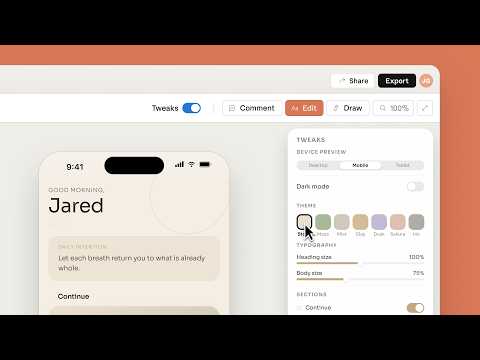
It is useful when you want the agent to read real frames, variables, components, and layout relationships instead of relying on screenshots or manually copied specifications.
v0
v0 focuses on generating applications and interfaces from natural-language instructions.

It works well for rapid UI exploration, functional prototypes, and initial React or Next.js implementations. You should review the output against your own architecture, design system, and performance requirements.
Chrome DevTools AI assistance
Chrome DevTools AI assistance helps you investigate a rendered website.

You can use it to understand CSS problems, failed requests, source files, and performance data. Its agent tools are particularly useful when you want an AI coding workflow to verify what is happening inside the browser.
Storybook MCP
Storybook MCP gives AI agents access to your existing components, stories, documentation, and tests.
It can reduce invented components and help an agent work within the patterns your front-end team already uses.
Will AI replace front-end developers?
AI is unlikely to remove the need for front-end developers, but it is already changing what the job involves.
You may write fewer routine components by hand. You may spend more time describing requirements, preparing project context, evaluating generated changes, testing real behaviour, and making architectural decisions.
Developers who can combine front-end knowledge with AI developer tools will be able to move faster. Developers who rely on generated output without understanding it will create fragile products.
The valuable skill is no longer typing every line yourself. It is knowing what should be built, how it should behave, and whether the implementation is safe to ship.
Can AI create production-ready front-end code?
AI can create code that becomes part of a production application. The first output should rarely be treated as production-ready.
The code needs to be reviewed against your component system, browser support, security rules, accessibility requirements, performance targets, and product behaviour. The amount of correction depends on the task and the context available to the tool.
A small component based on documented patterns may require few changes. A complete application built from a short prompt will require much closer inspection.
What front-end tasks are easiest to automate?
AI works best on tasks with clear patterns and results.
Component scaffolding, basic styling, test drafts, documentation, code explanations, predictable refactors, and straightforward bug fixes are good starting points.
Tasks involving unclear requirements, complex product behaviour, unusual architecture, sensitive data, or subtle UX decisions need more direct developer involvement.
How should you use AI in frontend development?
Use AI as part of your existing engineering process.
Give it a specific task, provide the relevant context, inspect the generated changes, run automated checks, test the interface in the browser, and complete a human review before merging.
This approach gives you the speed of code automation without handing control of the product to the tool.
And there you have it!
AI development is turning front-end work into a tighter loop between planning, design, code, browser testing, and review.
You can move from an idea to a functioning interface much faster. You can ask an agent to reuse existing components, run tests, inspect the browser, and prepare a pull request.
Your role remains central. You provide the intent, context, standards, and judgment that turn generated code into a reliable experience.
The strongest workflow is not fully manual or fully automated. It is one where AI handles predictable execution while you stay responsible for the decisions that shape the product.
Before you go, don’t forget to check out our other awesome UI/UX design articles! We’ve got loads of tips and inspiration to help you create awesome designs.